
Quick start instructions for the EVP CodeShooter, a device that flashes tuning firmware to your vehicle's ECU. The process covers downloading the app, connecting and syncing the device, updating firmware, selecting a tune, and flashing the ECU.
Before You Begin
NoteWHEN FLASHING ECU: Turn off all high-draw accessories and make sure that battery has a sufficient charge, above 11.8 volts. Make sure vehicle device is connected to WIFI. Store CodeShooter in a dry area and unplugged from the vehicle's diagnostic port when not in use.
CodeShooter Quick Start Guide Instructions
- 1. DOWNLOAD APP IN APP STORE — Choose CodeShooter App that is applicable to your vehicle make and model.
- 2. CONNECT TO VEHICLE — Plug CodeShooter into vehicle diagnostic port with supplied cable.
- 3. SYNC DEVICE — Key-On vehicle. Open CODESHOOTER App and select device's serial number.
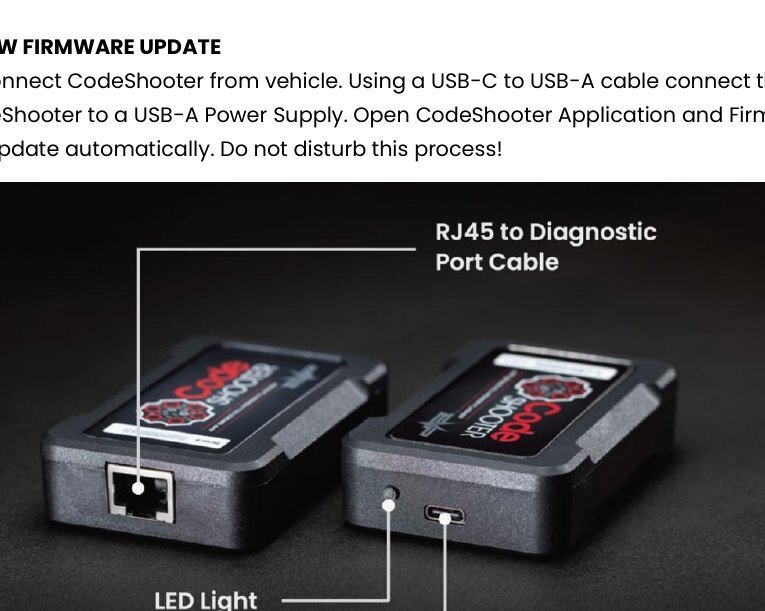
- 4. ALLOW FIRMWARE UPDATE — Disconnect CodeShooter from vehicle. Using a USB-C to USB-A cable connect the CodeShooter to a USB-A Power Supply. Open CodeShooter Application and Firmware will update automatically. Do not disturb this process!
- 5. CHECK VOLTAGE — Confirm voltage level at the top of the screen. Voltage must be at 11.8 volts or more!
- 6. SELECT TUNE — Tune will download from our server directly to your serialized CodeShooter device.
- 7. FLASH ECU — Do not unplug the CodeShooter or switch key off during the flashing process. When flashing is complete, turn key off. Then key on, start vehicle and ENJOY!
App Versions and Vehicle Compatibility
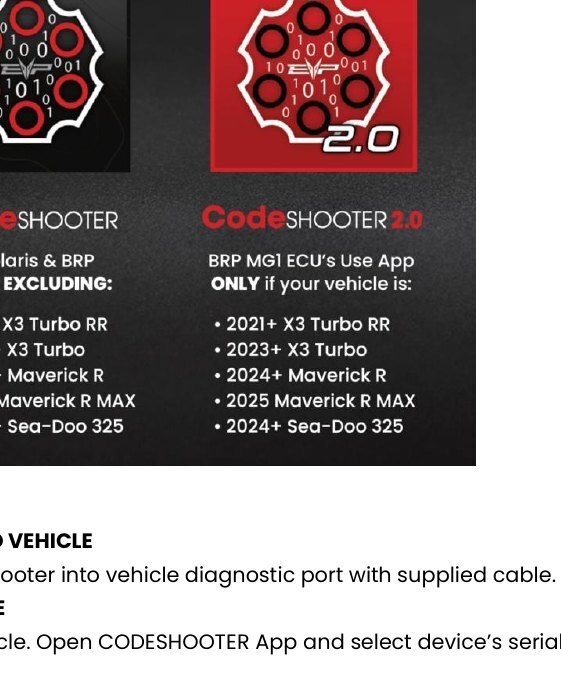
NoteCodeShooter (All Polaris & BRP Models EXCLUDING): 2023+ X3 Turbo R; 2023+ X3 Turbo; 2024+ Maverick R; 2025 Maverick R MAX; 2024+ Sea-Doo 325.
NoteCodeShooter 2.0 (BRP MAX ECUs Use App ONLY if your vehicle is one of these): 2023+ X3 Turbo RR; 2023+ X3 Turbo; 2024+ Maverick R; 2025 Maverick R MAX; 2024+ Sea-Doo 325.