Skip to content
English
  • There are no suggestions because the search field is empty.

Polaris Code Shooter with AFR, Belt Temp, & Boost for RZR Pro XP — Tuning Guide

Polaris · Pro XP (RZR)

What's in the Box

Included parts
AFR Module with Hardware Qty 1
Belt Temp Module with Qty 1
Hardware
Polaris Diagnostic Port Qty 1
Replicator
Can Am to Belt Temp Cable Qty 1
Code Shooter to RJ45 Cable Qty 1
Can Am to CAN Lambda Qty 1
Cable
NOTE: The EVP Code Shooter App allows yo
Temperature and Boost on your mobil
purchase these modules for Air/Fuel
the Map sensor and your plenum will
will show you how to locate your OB
Temperature module. If you have not
the instructions to the correct mod
NOTE: We recommend mounting these modules
these modules in a 2 seat RZR Pro X
customer can decide where they want
or an accessory bag. These modules
Instructions for Boost:
A benefit to Code Shooter is the device r
hardware or modules are needed for readin
already reads boost off the Map sensor(s)
device you can read live data coming from
plugged into the diagnostic port and pair
Instructions for AFR Module
Required tools
Unibit (Step Bit) 1 1/4"
1/2" Drill Bit
Push Dart Tool
T-40 Torx Socket
Sider Cutters
Welder (02 Bung)
Loctite/ Anti-Seize/ Silicone
Velcro
Rubber Gromet(s) (1-1/4”)
Zip Ties
u to display live data of Air/Fuel Ratio, Belt
e device. Optionally, you can pick and choose to
Ratio and Belt Temperature. Boost is measured of
always have a Map sensor(s). These instructions
D port, install Code Shooter, AFR module, and Belt
purchased all the modules you can skip through
ule you purchased.
in a clean, water resistant area. We installed
P and mounted the modules in the glove box. The
to mount the modules whether its in the glove box
are NOT waterproof.
eads right off your vehicles ECU. No additional
g boost with Code Shooter. Since the vehicle
in the plenum, with code shooter and your mobile
your vehicles ECU. Make sure your Code Shooter is
ed with your mobile device.

Installation

1
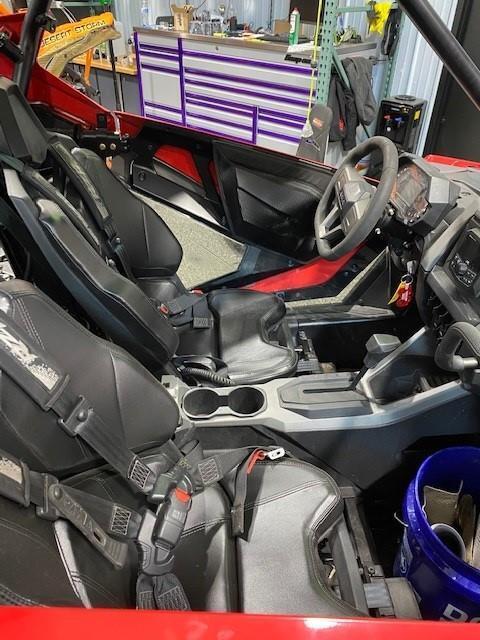
Remove both passenger and driver captain’s chairs.
2
Remove the rear firewall access panel to the turbo.
3
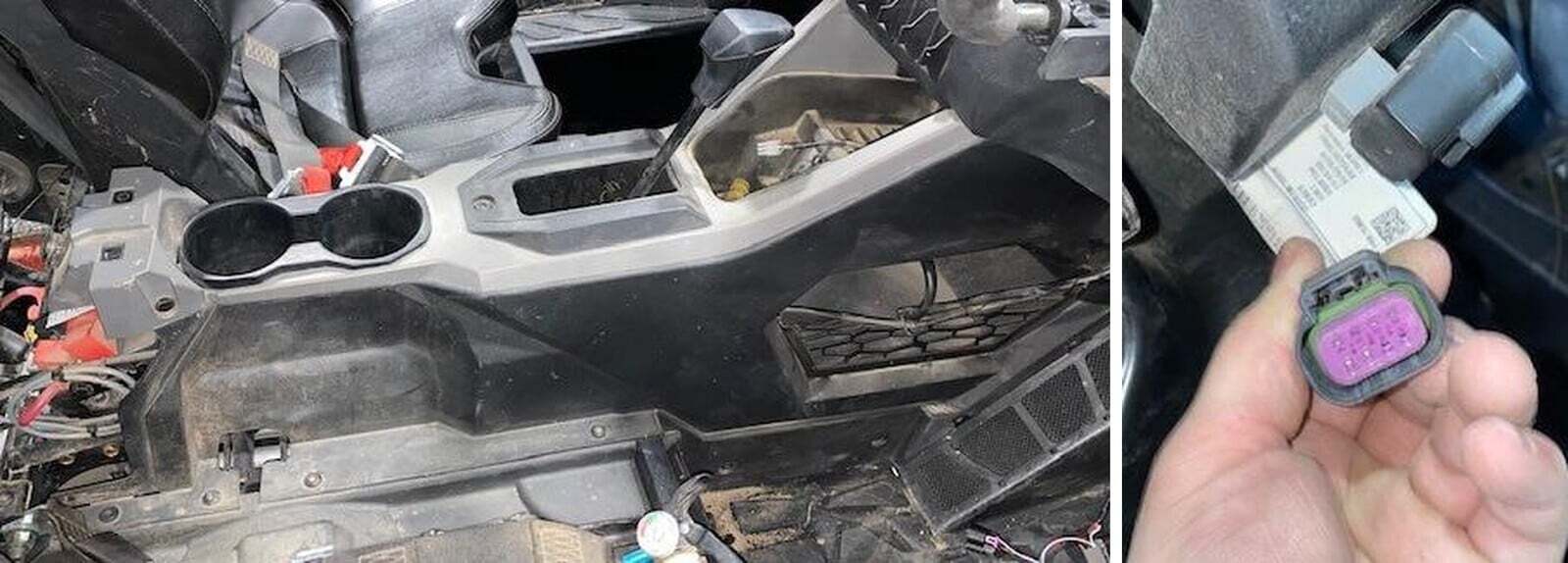
Remove the center console passenger side panel by removing (2) push darts and (8) T- 40 Torx. Push the shifter rubber boot down into the center console. On the rear of the center console there is a 12 Volt plug, disconnect the Positive and Ground wire off. These wires are very short, and we need to lift the silver part of the center console away from the side panel. (Figure 1).
4
Remove the passenger side panel from the center console. Pull up on the silver trim, and with a small flat blade screwdriver disconnect the clips from the side panel, start in the rear and work your way towards the front of the vehicle. Let the side panel lay on the passenger floorboard.
5
Underneath the steering column, you will locate the Diagnostic port. The Diagnostic port will be an 8-pin port with a purple internal clip. (Figure 2).
Polaris Pro XP (RZR) installation
6
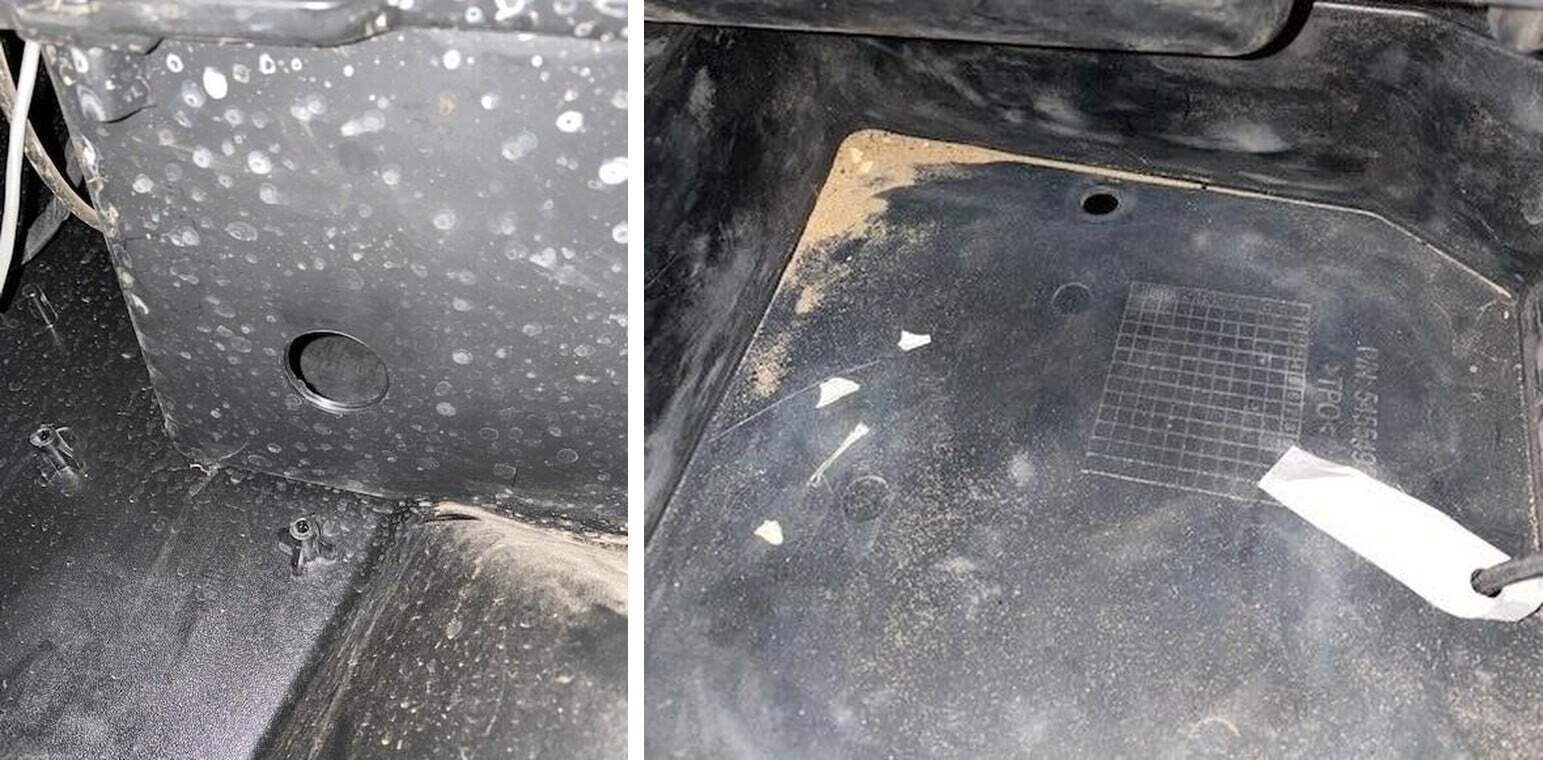
Locate the glove box, we will need to drill a 1 1/4" hole. To keep the wires and harness’s hidden, we drilled our hole in the already existing hole in glove box. Remove the OEM rubber gromet and drill from the bottom up. (See figures 3-4).
7
Grab the supplied diagnostic triple Indy wiring harness, feed the Polaris male (2 ft end) from the glove box, against the firewall on the inside of the cab, over to the Diagnostic plug underneath the steering column. Plug it into the vehicle diagnostic port. The triple Indy part of the plug will stay in the glove box.
8
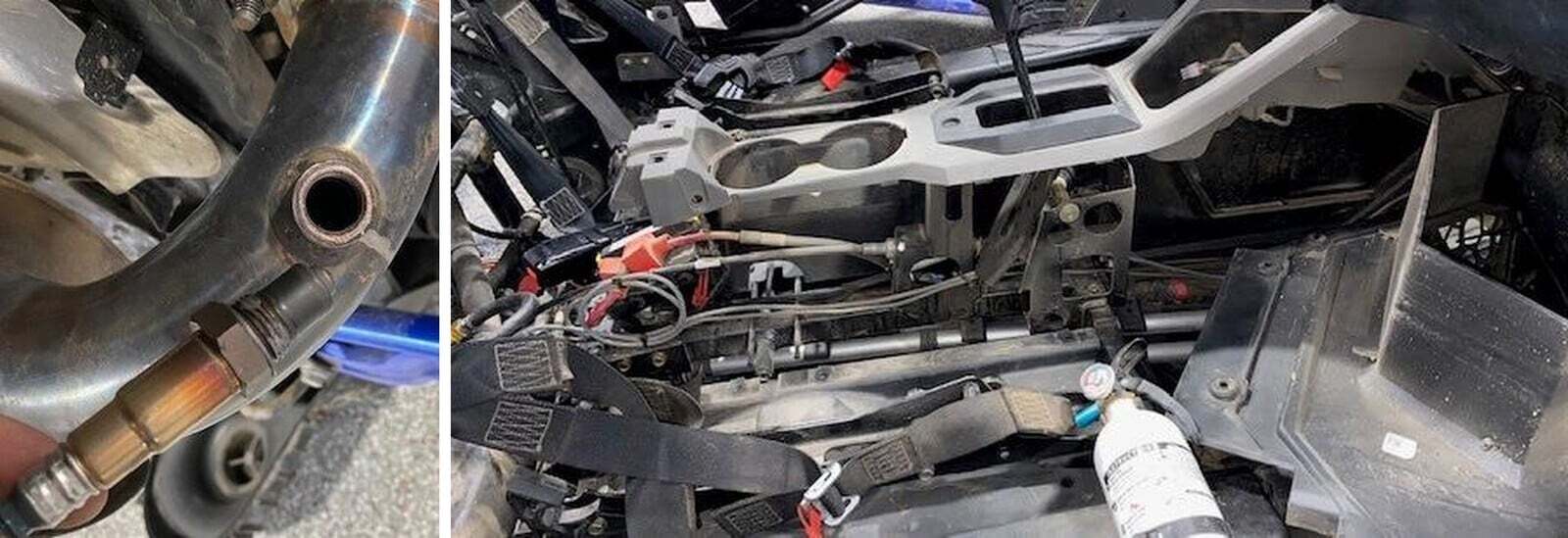
Grab the supplied 02 sensor and put anti seize on the threads. NOTE: Do not put anything on the tip of the sensor. (Figure 5).
9
With a 19mm wrench, remove the auxiliary 02 sensor bung plug. Install the 02 sensor into the bung, tighten down with a 22mm wrench.
10
Grab the supplied AFR wiring harness and plug it into the tail of the 02 sensor. Route the wiring harness away from any heat source, rotating parts, and so it won’t snag onto anything while riding. Run it through the rear firewall, underneath the center console supports, next to the shifter, and up to the firewall. If you do not already have an existing hole in your passenger side panel off your center console, drill a hole Figure 5 towards the front of the panel. Feed the AFR wiring harness Through the hole and into the glove box. Once complete, start strapping it with zip ties from the rear to the front. You can keep the access length up front, under the center console. (Figure 6-7).
Polaris Pro XP (RZR) installation
11
Plug the AFR wiring harness into the AFR module in the glovebox. From the AFR module plug in the grey adaptor to the triple Indy harness (the first or second grey plug). Cut the proper length Velcro and mount the module on the side of the glovebox.
1
If you have not already installed the AFR module, please see step 1-7 above underneath AFR Module. This is the same seven steps it takes to disassemble the car.
2
Now that the center console is out, glove box is drilled out, and the Polaris diagnostic harness is plugged in, we can continue.
3
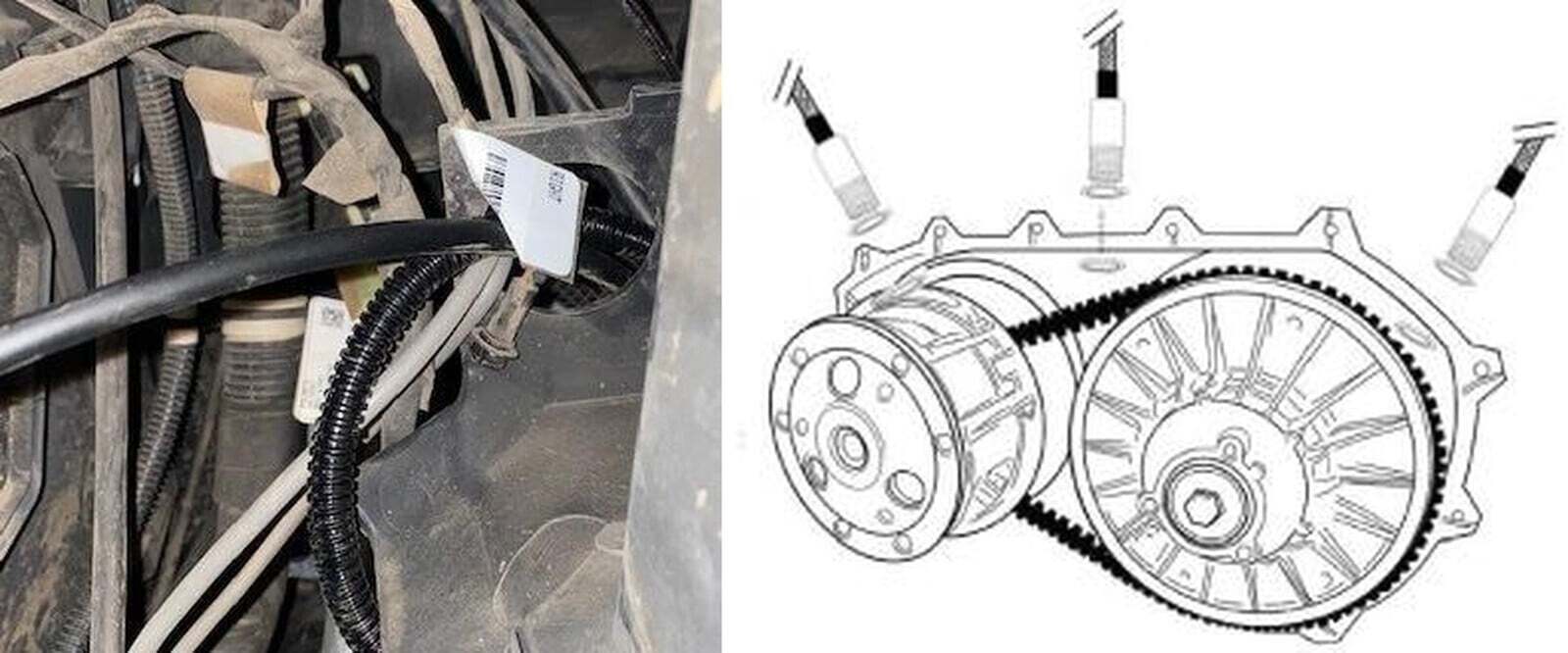
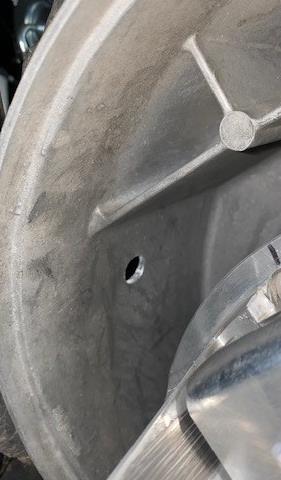
First thing we need to mount the Belt Temperature sensor. Don’t mount the sensor on the clutch cover, otherwise you need to remove it every time you need to maintenance your clutches. The RZR Turbo has a shelf in the middle of the clutch box, which makes the 12 o’clock position not very suitable for mounting. We mounted our Belt Temperature sensor in the 10 o’clock position. (See Figure 7).
4
With a hole punch or small diameter drill bit, start an indent on the clutch casing. NOTE: Make sure the belt sensor is directly in the middle of the belt. Once your indent is in the correct location, grab a 1/2” drill bit and drill the hole out. (Figure 8-9).
Polaris Pro XP (RZR) installation
5
Blow the debris away with compressed air and make sure inside the belt box is clean.
6
Grab the belt temperature sensor take both nuts off, apply a small amount of Teflon tape (since we are mount the sensor directly to the casting of the clutch box) place one.
7
Connect the Belt Temperature wiring harness to the pig tail on the sensor, route the harness through the rear firewall, down center console by the shifter, through the hole in the passenger side panel. Run it up the firewall and through hole in the glovebox where the diagnostic plug and AFR wiring harness did. (Figure 12-13).
8
With zip ties, start in the rear of the vehicle and strap the Belt Temperature wiring harness to the frame of the car, keeping the wiring harness away from heat sources and rotating parts.
9
Connect the Belt Temperature module to the belt wiring harness in the glovebox. From the Belt Temperature module, plug in the grey adaptor to the triple Indy harness (the first or second grey plug). Cut the proper length Velcro and mount the module on the side of the glovebox. Belt Temperature module. AFR module.
Polaris Pro XP (RZR) installation
10
If you would like to keep your glove box and center console sealed, purchase a 1 1/4" rubber gromet (for the glovebox) and a rubber gromet the same diameter you cut in the side panel. On the rubber gromet cut one end from the outside to the middle. Wrap the cables to the inside of the gromet and push it from the bottom of the glovebox in. Once the rubber gromet is seated, run a bead of clear silicone around the outside and middle of the gromet. This will help seal the glovebox. Do the same process for the center console side panel.
1
Zip tie any access wire underneath the center console.
2
Reassemble the center console, pull the shifter boot till they are seated and reconnect the Positive and Ground to the 12 Volt plug. Secure the center console with (8) T-40 Torx bolts and (2) push darts.
3
Reassemble the firewall and rear access panel.
4
Reassemble both driver and passenger seats.
Polaris Pro XP (RZR) installation
5
Reassemble the clutch cover.
Polaris Pro XP (RZR) installation

Note: This product is exempt from the emission standards and related requirements of 40 C.F.R. § 1051 as provided by 40 C.F.R. § 1051.620, and California law [e.g., vehicle code§§ 27156 and 38391]. This product is sold only for use in connection with EPA certified, purpose-built, nonroad vehicles used solely for closed course, nonroad competition/racing and not used for any recreational purpose or on public highways or right of ways maintained by and open to the public. This product is sold only in connection with machines that do not fall under state and/or federal noise or emission standards/regulations. Purchasers who/that purchase this product represent and warrant that the product is purchased only in connection with EPA -certified, emission-regulations-exempt and noise- regulations-exempt competition/racing vehicles as interpreted under applicable state and/or federal law. Questions: Call Evolution Powersports at (715) 247-3862.