
Skip to content
English
  • There are no suggestions because the search field is empty.

Can-Am WKP X3 Solid Motor Mounts — Install Guide

Can-Am · Maverick X3 · SKU 804FC0120

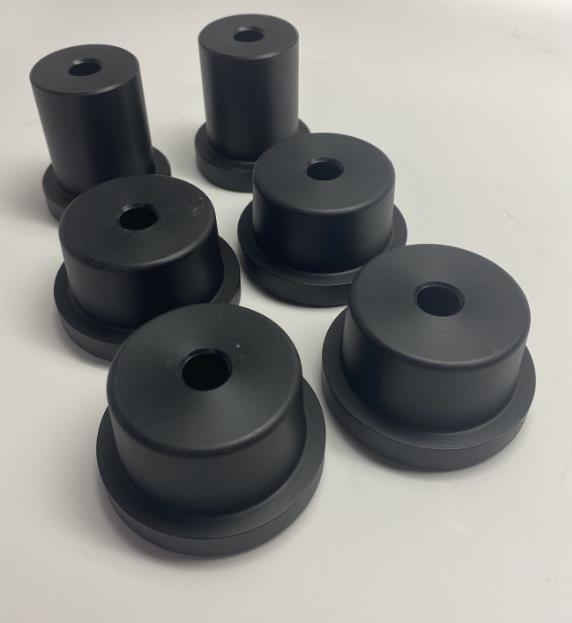
What's in the Box

Can-Am Maverick X3 kit contents
Included parts
HD Motor Mounts Qty 4
HD Transmission Mounts Qty 2
Required tools
Hammer/Mallet
13mm Socket/Open End Wrench
Flat Head Screwdriver
Torque Wrench

Installation

1
Disconnect all items attached to motor. See diagram below for reference. Motor/transmission mounts circled.
2
Remove motor from car.
3
Remove (4) OEM motor mounts on the front side of the motor.
4
Install (4) solid motor mounts, tap lightly with a mallet until the solid motor mounts are fully seated. Reuse OEM bolts.
5
Remove (2) transmission mounts located on the back of the motor.
6
Install (2) solid transmission mounts, tap lightly with a mallet until the solid motor mounts are fully seated. Reuse OEM bolts.
7
Reinstall motor and components back into car. Torque 13mm motor/transmission bolts to 37 ft lbs.

Note: This product is exempt from the emission standards and related requirements of 40 C.F.R. § 1051 as provided by 40 C.F.R. § 1051.620, and California law [e.g., vehicle code§§ 27156 and 38391]. This product is sold only for use in connection with EPA certified, purpose-built, nonroad vehicles used solely for closed course, nonroad competition/racing and not used for any recreational purpose or on public highways or right of ways maintained by and open to the public. This product is sold only in connection with machines that do not fall under state and/or federal noise or emission standards/regulations. Purchasers who/that purchase this product represent and warrant that the product is purchased only in connection with EPA -certified, emission-regulations-exempt and noise- regulations-exempt competition/racing vehicles as interpreted under applicable state and/or federal law. Questions: Call Evolution Powersports at (715) 247-3862.